
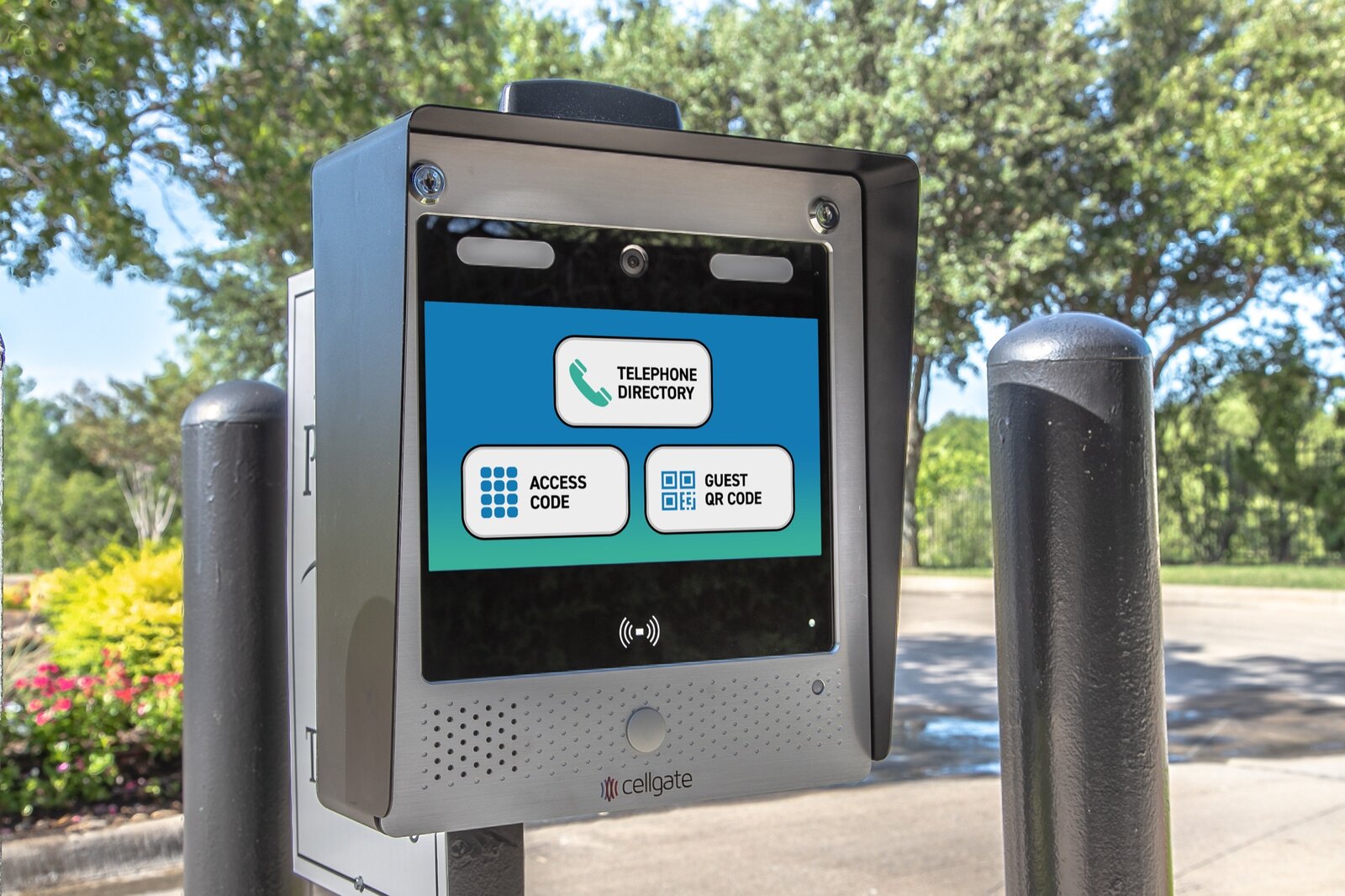
When a visitor pulls up to a gate, there are really only three questions: how does this person get in, who decides, and what happens when nobody is around to answer. Most entry panels today answer those questions with the same three buttons you can see in the photo above: a Telephone Directory, an Access Code and a Guest QR Code. They look like three versions of the same thing. In practice each one solves a different problem, and choosing the wrong mix is how communities end up with propped-open gates and shared codes that never get changed.
Here is how I explain the three to HOA boards, property managers and homeowners around Tampa Bay, and how I decide which ones a gate actually needs.
Option 1: The Directory Call-Up
The directory is the oldest idea of the three. A visitor scrolls or searches for a resident's name, the panel places a call, and the resident answers and lets them in. On a modern cellular panel, that call can go to a cell phone instead of a landline, so the resident does not have to be home to answer it.
It works well when:
- Visitors are unexpected or unfamiliar, such as a delivery driver, a contractor, or a friend who has never been to the property.
- The resident wants to hear and decide in the moment before anyone is let through.
- You want residents to keep control without anyone handing out codes.
Where it falls short is the other side of the same coin: it only works if somebody picks up. A resident who is at work or in the shower sends the driver away, and the driver calls the front office or just waits for the next car to go through. The directory is a good front door for the unexpected. It is a poor plan for anyone who comes regularly.
Option 2: The Access Code
Access codes are for people who come and go all the time: residents, staff, the lawn crew, a regular cleaning service. They are fast, they do not need a phone call,, and they work even when the resident you are visiting cannot pick up the phone.
The trouble with codes is not the technology. It is people. A code is just a number, and numbers get shared. One resident gives it to a cousin, the cousin gives it to a friend, and a year later nobody knows who has it. I see this at older properties all the time: the same four digits have been in use for years, because changing them means telling everyone.
A few habits make codes far safer:
- Give each resident or vendor their own code, so a single code can be turned off without disturbing anyone else.
- Keep a short list of who holds which code, and review it at least once a year.
- Remove codes the day a tenant moves out or a vendor contract ends.
- Never use one shared code for a whole community if the system allows individual ones.
Option 3: The Guest QR Pass
The guest pass is the newest of the three, and the one that solves the most everyday headaches. Instead of giving a visitor a code to remember or hoping they call the right unit, a resident (or the office) issues a pass ahead of time. It is a QR code or PIN, sent to the guest's phone. The guest holds the QR code up at the panel or enters the PIN, and the gate opens.
What I like about it as an installer is that the pass can be limited. With CellGate, the person issuing it can choose which gates it opens and set it to expire on its own. That means a dog walker, a party guest or a one-day contractor gets in without anyone sharing a permanent code, and nobody has to remember to cancel anything afterward.
It fits well for:
- Planned visitors: family, party guests, home health aides, movers and one-time service calls.
- Properties where the office or a manager issues passes for vendors and contractors.
- Anywhere you want a record of who was invited rather than a number that anyone could pass along.
The one requirement is that somebody has to set the pass up before the visitor arrives. If the guest shows up with no pass, you are back to the directory.
Field Note
The most common complaint I hear at gates is not that the system is broken. It is that the wrong method got used for the job. Codes were handed to visitors who should have had a pass, and directory calls were used for people who come every day. When you match each type of visitor to the right button, most of the complaints and most of the service calls go away.
Matching the Method to the Visitor
When I walk a property, I sort the traffic into groups first and only then choose the entry methods. A simple version looks like this:
- Residents and employees: individual access codes or credentials, so each person can be added or removed on their own.
- Regular vendors: their own codes or recurring passes, reviewed on a schedule.
- Planned guests: a QR or PIN visitor pass that expires by itself.
- Unexpected visitors: the directory, so a resident can see and hear who it is before deciding.
A single-family driveway gate may only need a code and the occasional call. A 200-unit community with a leasing office wants all three working together, and the office should know who has the authority to issue passes.
What the Panel Itself Needs From You
The buttons are only as useful as the panel behind them. A few practical points we check on every install:
- A clean, readable screen. Sun glare is a real problem in Florida. A hood over the display, like the one on the unit in the photo, helps people see the buttons in the middle of the day.
- Mounting height. The panel should be reachable from a car window without anyone stretching, and still usable by someone on foot.
- A reliable connection. Cellular panels do not depend on a phone line, which is one less thing to fail, but they still need good signal at the location.
- Surge protection and good grounding. Florida thunderstorms are hard on anything connected to a gate, and a good panel is wasted if the power feeding it is not protected.
Questions to Ask Before You Choose
Before you pick a panel or change how your gate works, ask yourself a few questions. Who uses this entrance every day, and who uses it once a year? Who in the community is allowed to let someone in? How quickly can access be removed when someone leaves? And what happens at 10 p.m. on a Sunday when a driver cannot reach anyone? If you can answer those, the right mix of directory, codes and passes usually becomes obvious.
If you are not sure, that is what a site visit is for. I will look at your gate, your traffic and your current setup, and tell you plainly what you need and what you can skip.