
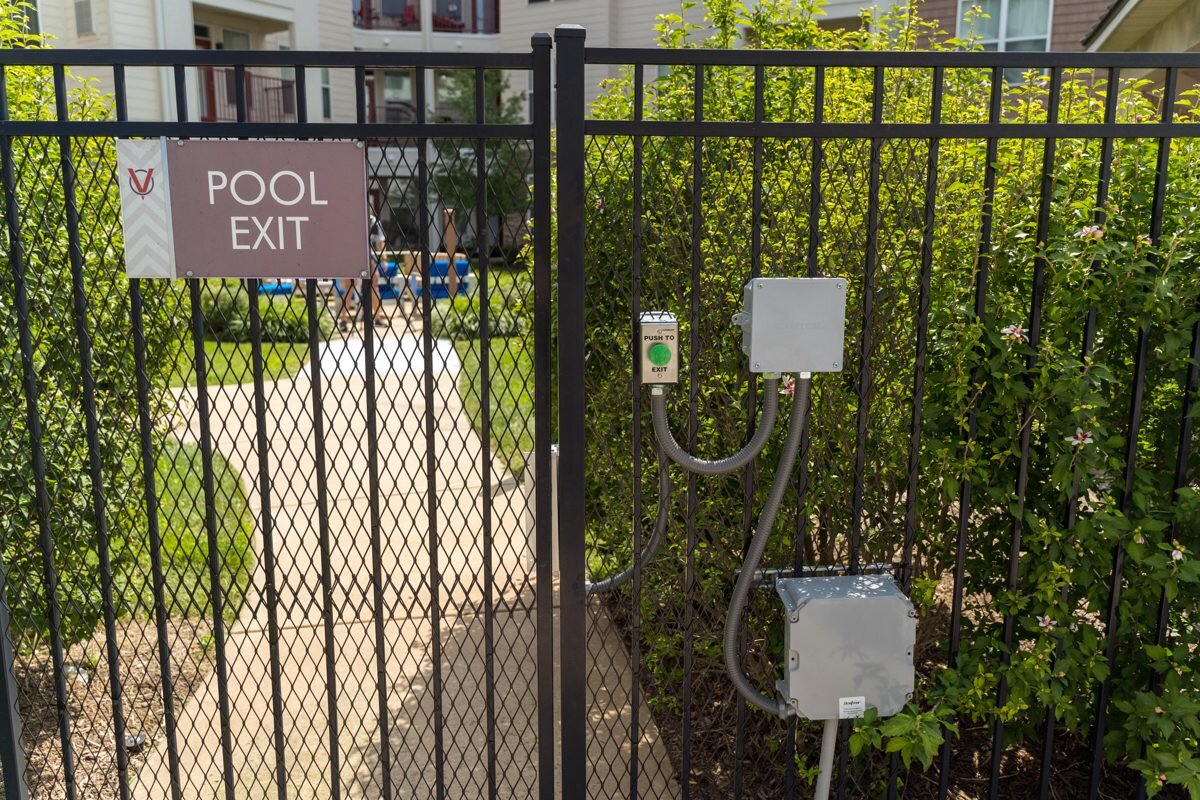
Walk past almost any apartment community or HOA pool in Tampa Bay and you will see the same thing: a black metal fence, a gate, and a small group of boxes bolted next to it. That is exactly what the photo above shows. It is a pool gate with a green push-to-exit button, two junction boxes, and flexible conduit running between them. It looks simple, and it is, but the details behind it decide whether the gate is secure, convenient and safe to leave in service.
We get called out to pool gates for a handful of reasons: fobs that stopped working, a gate that no longer latches, an exit button that sticks, or a board manager who wants to know who actually used the gate last Saturday. This post covers how a good pool gate access setup works and what to ask for before you spend money.
What a Pool Gate Access System Is Made Of
A pool gate is a pedestrian gate, so the parts are different from a driveway operator. In most installs you will find four pieces working together:
- An electric lock or strike that keeps the gate locked from the outside and releases when it is told to.
- A reader or keypad on the entry side that checks a fob, card, code or phone credential.
- A push-to-exit button on the inside so anyone leaving never needs a credential. That is the green button in the photo.
- A control box and power supply that tie the lock, reader and exit button together. The gray junction boxes and conduit are where those connections live.
If any one of those is missing or poorly done, you get the complaints we hear most often: residents propping the gate open, guests wandering in, or a gate that locks someone inside.
Exit Hardware Comes First
People spend their time picking the reader and forget the exit side. A pool area needs a clear, obvious way out, every time, without a credential and without power tricks. A big, labeled push button that is easy to find and easy to press is the right idea. Check how the lock behaves in a power outage too. Whether a lock releases or stays locked when power drops is a design decision, and it should be made on purpose, with your property manager and the local authority that governs your pool, not left to chance. We are installers, not code officials, so we always tell customers to confirm pool barrier and egress requirements with their local building department or pool inspector before the final design.
Choosing How Residents Get In
There are several ways to credential a pool gate, and each fits a different property:
- Key fobs or cards. Familiar, fast, and easy to deactivate when a fob is lost or a resident moves out. The downside is that fobs get shared and lost, so you need a way to disable them quickly.
- Keypad codes. No hardware to hand out, but codes get shared. Fine for a small community if you change them on a schedule.
- Phone-based credentials. No plastic to lose, and access can be turned off remotely. This is where cellular systems like OmniPoint and CellGate’s mobile credentials are worth a look.
- Shared credentials with the main gate. If your community already uses one access system at the front gate, putting the pool on the same system means one resident list to manage instead of two.
For multi-building apartment communities, wireless access control such as OmniPoint can be a practical way to add a pool gate without trenching new cable across a landscaped property. Whether it fits your site depends on distance and signal, which is something we check on a walk-through, not something we guess at.
Why Audit Trails Matter at a Pool
A pool is a shared amenity with real liability attached. A system that logs which credential opened the gate and when gives your board or manager answers when there is a dispute, a vandalism report, or a question about after-hours use. A bare mechanical lock can’t do that. If you also have a camera covering the pool entrance, you can match the log entry to what the video shows. We usually recommend the camera sits where it sees the gate and the approach, not the pool deck itself, to respect residents’ privacy.
Field Note
The most common pool gate call we get is not a bad reader. It is a gate that no longer latches. Florida heat and humidity swell and shift fence posts, and when the gate drifts out of alignment the lock never fully catches, so people assume the access system is broken. Before you replace any electronics, check that the gate swings freely and closes on its own into the latch. A self-closing hinge adjustment is cheaper than a new reader.
Built for Florida Weather
Pool gates sit in the worst spot on a property: sun, sprinklers, chlorine air and summer storms. Look for hardware rated for outdoor use, sealed junction boxes, and conduit that is properly fastened and sealed where it enters each box. In the photo, the flexible conduit is the kind of thing we inspect first on a service call, because loose or cracked fittings let water in and water kills control boards. Keep sprinkler heads from spraying the readers and boxes directly, and trim plants away from the hardware so nothing is rubbing on the wiring.
A Quick Pool Gate Checklist
- Does the gate close and latch by itself every time, without a push?
- Is the exit button clearly visible, labeled and easy to press from inside?
- Can you deactivate a lost fob or code the same day?
- Is there a record of who opened the gate and when?
- Are junction boxes sealed and conduit secured?
- Has the lock’s power-loss behavior been chosen deliberately and confirmed with the local authority?
Upgrading Without Starting Over
You do not always need to rip out what you have. Many older pool gates can be upgraded in place: swap a worn lock, replace the reader, tie the gate into your existing access system, or add remote credential management. We will tell you straight if a repair is all you need. If the fence, hinges or posts are the real problem, we will say so rather than sell you electronics that will not fix it.
Talk to the Technician Who Does the Work
Ark Security Solutions serves apartment communities, HOAs and property managers across St. Petersburg, Tampa, Bradenton, Sarasota and Southwest Florida. If your pool gate is unreliable, hard to manage, or you are not sure it is set up the way it should be, call (727) 660-5307 or reach us through the contact page and we will take a look.
← Back to All Posts