
Most people shopping for security cameras start with the camera: resolution, brand, price. After years of installing them around Tampa Bay, I can tell you the camera is the easier half. Where it goes decides whether the footage is useful. A mid-range camera in the right spot beats an expensive one pointed at the wrong thing every time.
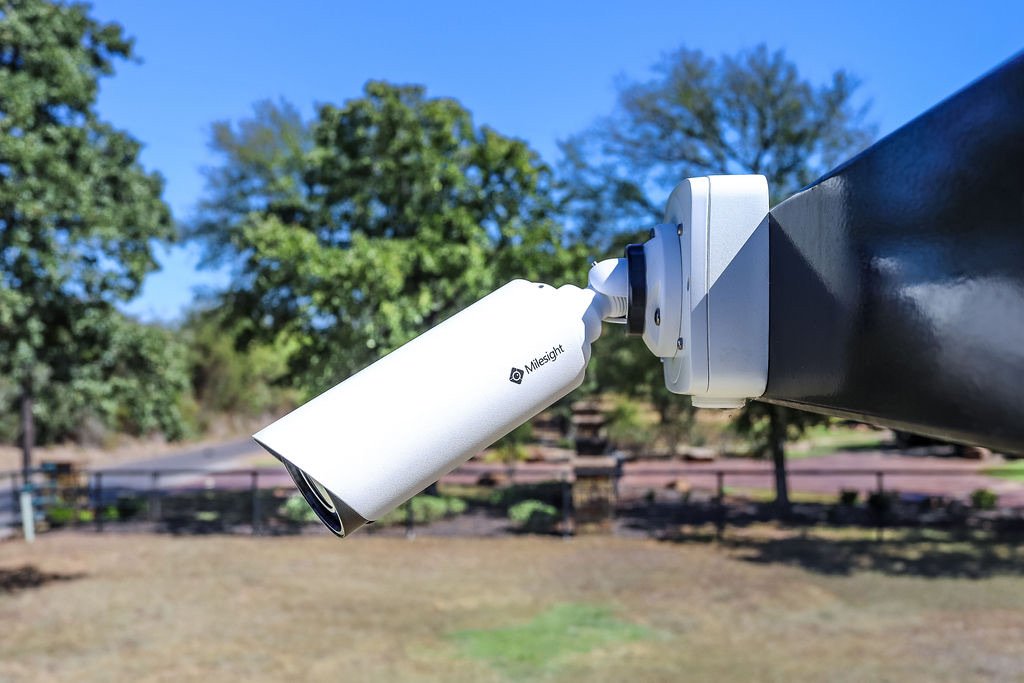
The camera in the photo above is a typical example: a white bullet camera on a short bracket, mounted on a solid post at the edge of a property, looking out across the approach. It is simple, it is out of easy reach, and it has a clear view. Here is how we think through placement at a gate or entrance.
Start With the Question: What Do You Need to See?
Before anyone picks a mounting spot, we ask what the footage has to answer. At an entrance it is usually one of these:
- Who came in? That calls for a face-level view of drivers and walk-up visitors.
- What vehicle was it? That calls for a view of the whole vehicle and, if possible, the plate, from a straight-on or gently angled approach.
- What happened at the gate? That calls for a wider view that includes the gate, the keypad or callbox, and the area around them.
One camera rarely answers all three. That is not an upsell; it is just how lenses work. A wide view and a tight plate view are different jobs, and trying to make one camera do both usually means it does neither well.
Height and Angle
Mount high enough to be out of reach, low enough to see faces
A camera mounted well above arm's reach is harder to knock, spray, or turn away. But there is a trade-off: the higher the camera, the steeper the downward angle, and the more you see the tops of heads and hats instead of faces. We aim for the middle ground, high enough to be out of easy reach and low enough that the angle still shows a face. On a gate post or wall, that is a judgment call made on site, not a number from a chart.
Look along the path, not across it
People and vehicles are easiest to identify when they are walking or driving toward the camera. A camera that looks straight across a driveway catches a side profile for a fraction of a second. A camera that looks along the approach gets a front view for the whole time someone is coming toward the gate.
Mind the sun
Florida sun is hard on image quality. A camera that faces directly into a low morning or evening sun can wash out the very moment you need. When we walk a property, we check where the sun sits at different times of day and try to keep it behind or beside the camera rather than in its face.
Field Note
The most common placement mistake we see is a camera mounted where it is easy to install rather than where it can see. A camera on the front of a building that looks at a tree, or one tucked under an eave that only sees the roofline of a car, is a camera that records but does not help. If you only change one thing, walk to where the vehicle or person would be and look back at the camera. If you cannot see a clear line to their face or the car, the camera cannot either.
Protect the Camera Itself
A gate or entrance is a rough place for electronics. Cameras there deal with sun, rain, salt air near the coast, and the occasional bump from a mirror, a branch, or a delivery truck.
- Mount to something solid. A post or structural wall that does not move. A camera on a flexing gate leaf or a loose pole will give you shaky video.
- Use a proper junction box and sealed cable entry. Water getting in at the cable is a common reason outdoor cameras fail early. The small box behind the camera in the photo is there for this reason.
- Keep branches trimmed. Moving leaves can trigger false motion alerts all night, and a growing limb will eventually block the view.
- Think about where the cable will run. A clean, protected run is part of the placement decision, not an afterthought.
Power and Connection
Placement is limited by how the camera gets power and sends its video. Most professional cameras use a single network cable that carries both, which makes the cable path a real factor in where a camera can go. Wireless cameras still need power, and they need a solid connection back to the system. If you are weighing the two approaches, our post on wired vs wireless security cameras covers the trade-offs.
At a gate, also think about what happens when the power is out. If the camera shares power with the gate operator or entry system, an outage can take both down at once. A backup power plan for the recorder is worth a conversation.
Placement for Common Entrance Setups
Single-family driveway gate
One camera looking up the driveway toward the street covers arrivals and the gate. A second covering the keypad or doorbell area is a common addition if package deliveries or visitors are a concern.
HOA or community entrance
These usually need separate views for entering and exiting lanes, plus a view of the visitor entry station. Lighting and lane layout matter a lot here. If you are on a board and weighing options, see our guide to HOA and multifamily gate access control.
Commercial property
Businesses often need the entrance, the loading area, and the parking lot covered. Here, a short list of what you actually need to see keeps the system affordable and the footage useful.
Think About How the Footage Will Be Used
If there is ever an incident, you or your insurer will want clear, timestamped footage. We covered what makes footage useful in our post on camera footage and insurance claims. Good placement is the foundation: it is hard to fix a bad angle with software later.
Get a Second Opinion Before You Drill
If you already have cameras and are not sure they are in the right spots, or you are planning a new system, we are happy to walk the property with you. We will look at the approach, the sun, the power and cable options, and tell you honestly what we would do and why. No hype, just what has worked on the properties we service across St. Petersburg, Tampa, Bradenton, and Sarasota.
← Back to All Posts